How I Used Jev with Salesforce to Make Real-Time AI Decisions on Support Cases
A practical Salesforce experiment using Jev to turn free-text support cases into typed decisions for category, impact, urgency, and information sufficiency.
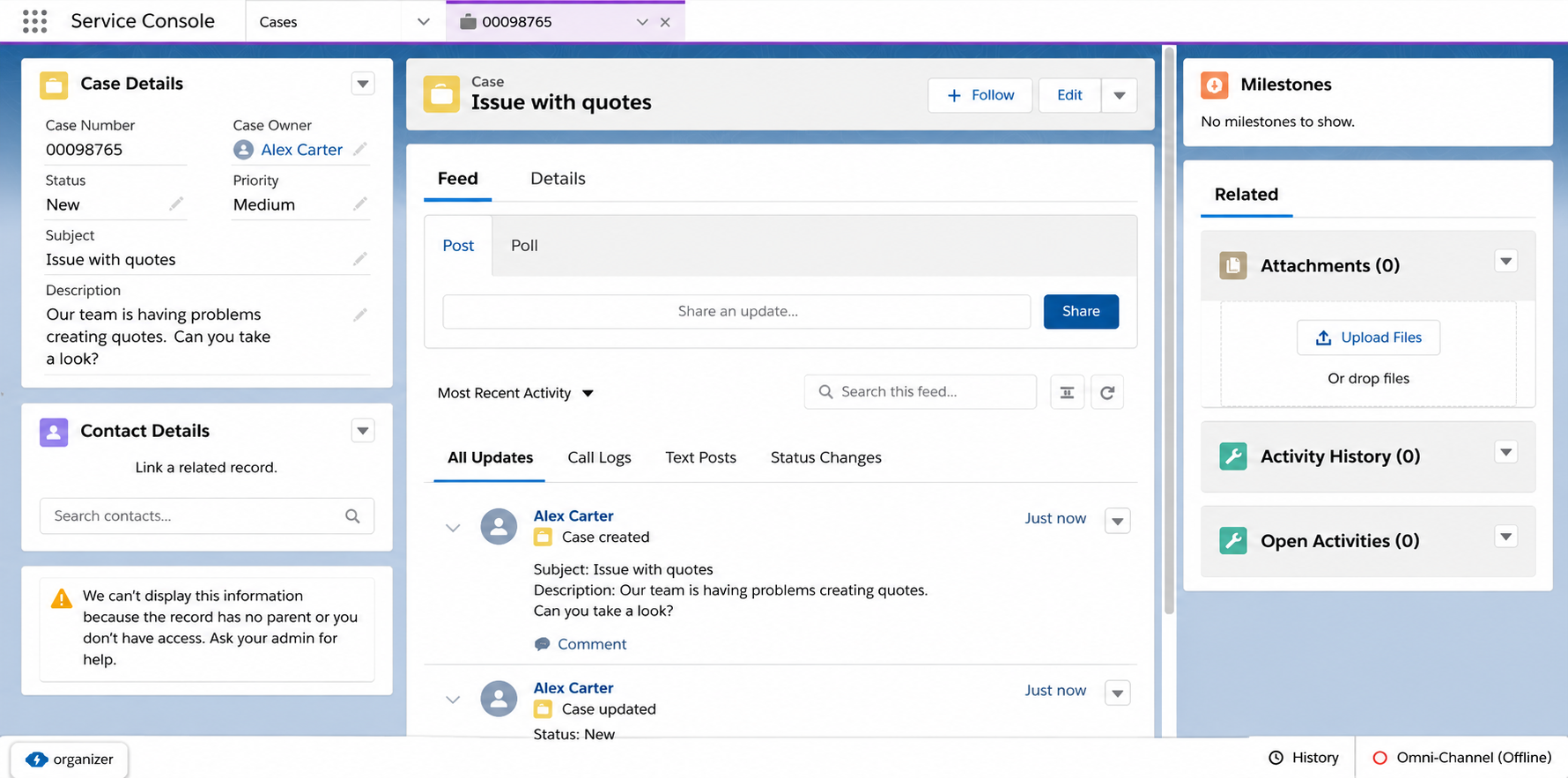
A support case arrives in Salesforce with this description:
This isn't urgent, but none of our 80 sales reps have been able to create quotes since yesterday. We have a customer demo this afternoon.
An assignment rule can handle that exact sentence. The problem starts when customers describe the same situation in hundreds of different ways.
I used Jev, TypeSafe AI's first System One model, to test a narrow idea: let the model interpret the free text, then hand the result back to normal Salesforce automation.
When a Case is created, Salesforce sends the relevant text to Jev and asks four things:
- What kind of issue is this?
- How broad is the impact?
- How urgent is it?
- Is there enough information to start investigating?
Jev returns typed, probabilistic answers. Salesforce decides what to do with them.
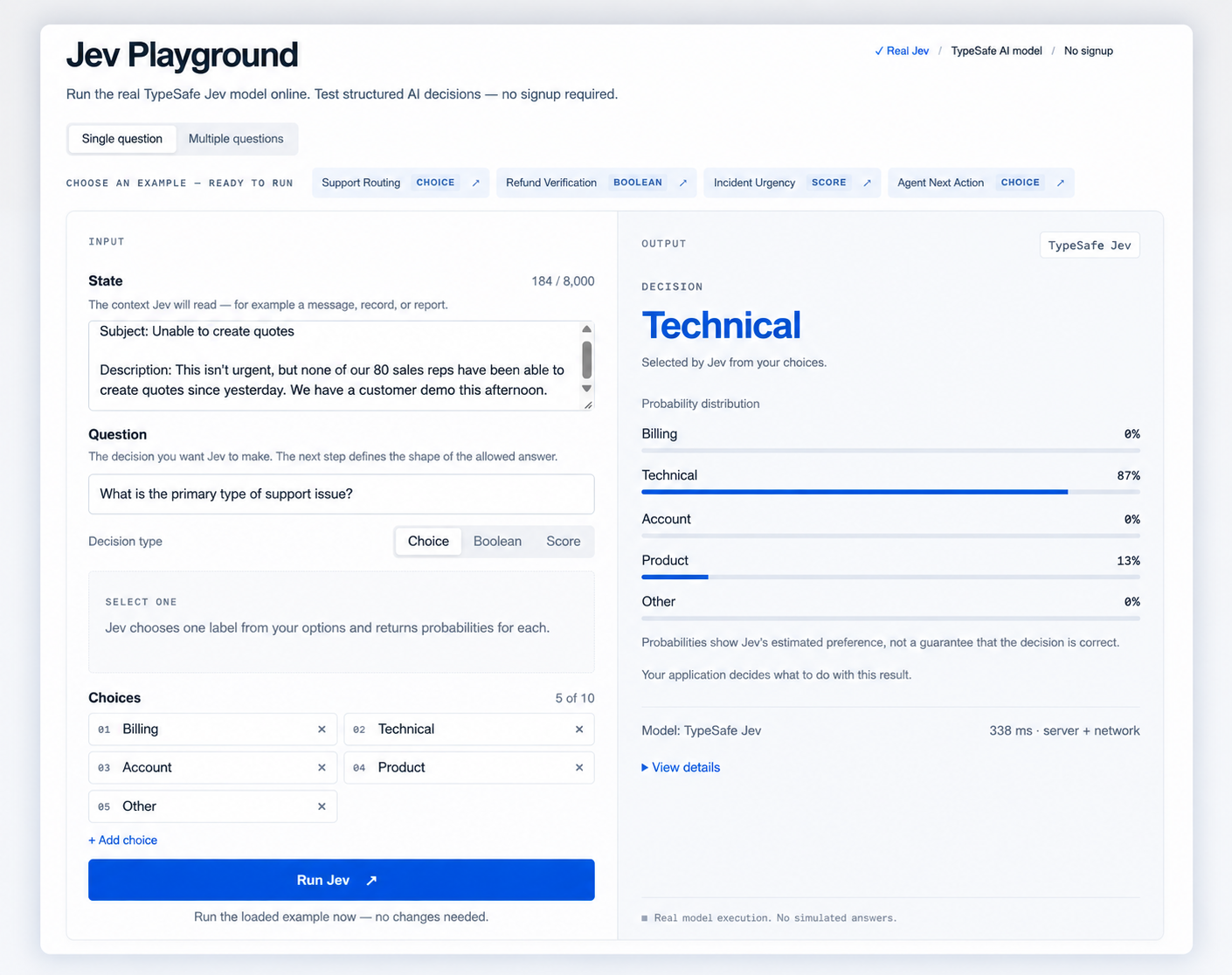
Jev returns decisions
Jev is the first public System One model from TypeSafe AI. The company describes System One models as models built for decisions inside software rather than text generation for humans.
That shows up directly in the API. I send a state and a set of typed questions. Each question uses one of three primitives:
- choice: choose one option from a predefined set;
- score: place something on an ordered scale;
- noul: return a calibrated probability for a yes/no question.
TypeSafe describes this as type safety. The response also includes probabilities and confidence, so the application can treat a strong result differently from an uncertain one.
One of the most interesting aspects of this model is its speed and cost in comparison with the latest frontier NPL models and that is one of its strongest features.
LLMs can already classify a Case
A normal LLM can take the same Case description and return structured JSON:
{
  "category": "technical",
  "impact": "high",
  "urgency": "critical",
  "informationSufficiency": "sufficient"
}
Structured outputs already make that response much safer to consume in code. Classification itself is not new here.
What interested me was the shape of the operation. This flow does not need prose, a summary, or generated content. It needs four small decisions that another program will consume immediately. Jev is built around typed outputs, probabilities, several questions evaluated against the same state, and low latency.
I still need data before trusting the automation. Terms such as "high impact", "urgent", or "enough information" are definitions I supply. A labelled set of real or representative Cases is how I would measure whether those definitions work and where the confidence thresholds should sit
The Case triage I built
I deliberately skipped problems Salesforce already solves well with deterministic rules. If Leads from Spain go to one queue and Leads from France to another, an assignment rule, Flow, or a few lines of Apex are easier to understand and maintain.
Free-text support Cases are different. Compare these two descriptions:
"One user gets an error when creating a quote."
and:
"Nobody in our sales team can create quotes. We have 80 users blocked and a customer presentation in two hours."
The product area may be identical. The operational meaning is not.
I split that meaning into four decisions.
Category
Question: What is the customer actually contacting us about?
For the prototype, I used a closed set similar to:
TECHNICAL
BILLING
ACCOUNT
PRODUCT
OTHER
This is a choice question. Jev classifies the language; Salesforce maps the result to CRM objects. If Jev returns BILLING, a normal Salesforce rule can map it to Billing_Support_Queue.
Impact
Question: How much of the customer's operation is affected?
I modelled impact as an ordered scale:
LOW
MEDIUM
HIGH
BUSINESS_WIDE
"One user cannot reset their password" and "our entire warehouse cannot print labels" should not produce the same impact signal just because both could be technical Cases.
This is awkward to derive from keywords. Customers rarely populate a neat field such as Affected Users = 80; they describe the impact in their own words.
Urgency
Question: How quickly does this need attention based on the situation described?
I kept urgency separate from impact. A system can affect many users without being time-sensitive. One person can also be blocked from something that has to happen in 20 minutes.
Jev does not set Case.Priority here. It produces an urgency signal. Priority remains a Salesforce business rule.
Information sufficiency
Question: Is there enough information for a support agent to start investigating without first asking the customer for clarification?
"Enough information" depends on the category. I would count only details stated in the Case text or fields sent to Jev. The table makes each label testable: sufficient means every listed requirement is present; partial means the issue and its target are identifiable but a requirement is missing; insufficient means either the issue or its target cannot be identified.
| Category | INSUFFICIENT | PARTIAL | SUFFICIENT |
|---|---|---|---|
| Technical | Affected service/feature or observable issue is unknown. | Service and issue are clear, affected scope or start/last-working time is missing. | Service/feature, error, affected scope, and start/last-working time are all stated. |
| Billing | Billing issue or affected account/transaction is unknown. | Account/transaction and disputed charge are clear, amount or billing period/date is missing. | Invoice/transaction reference, amount, billing period/date, and disputed versus expected charge are stated. |
| Account | Account/organization or requested/failed operation is unknown. | Account and operation are clear, affected user/setting/permission or actual result/error is missing. | Account/organization, affected user/setting/permission, operation, and actual result/error are stated. |
| Product | Product/feature or problem is unknown. | Product, feature, and problem are clear, version/plan, expected-versus-actual behavior, or reproduction/error detail is missing. | Product and version/plan, feature, expected behavior, actual behavior, and reproduction steps or exact error are stated. |
| Other | Affected item or actionable request/problem is unknown. | Target and request/problem are clear, observed symptom or desired outcome is missing. | Affected item, clear request/problem, and observed symptom or desired outcome are stated. |
Where Jev stops and Salesforce starts
I kept interpretation and business policy separate.
Jev receives language and returns signals:
Category                → TECHNICAL
Impact                  → BUSINESS_WIDE
Urgency                 → CRITICAL
Information Sufficiency → SUFFICIENT
Salesforce already knows facts that do not need an AI model:
Account Tier   → Enterprise
Support Plan   → Premium
Entitlement    → 24x7
Region         → EMEA
Business Hours → EMEA Support
The CRM can combine both sets of values with ordinary rules:
Category = TECHNICAL
→ Technical Support Queue

Impact = BUSINESS_WIDE
AND Urgency = CRITICAL
AND Support Plan = Premium
→ Case Priority = Critical

Information Sufficiency = INSUFFICIENT
→ Start "Request More Information" flow
Jev does not need a Queue ID, the name of an active Flow, or the company's SLA policy. I keep those rules in Salesforce, where admins can inspect and change them without touching the model instructions.
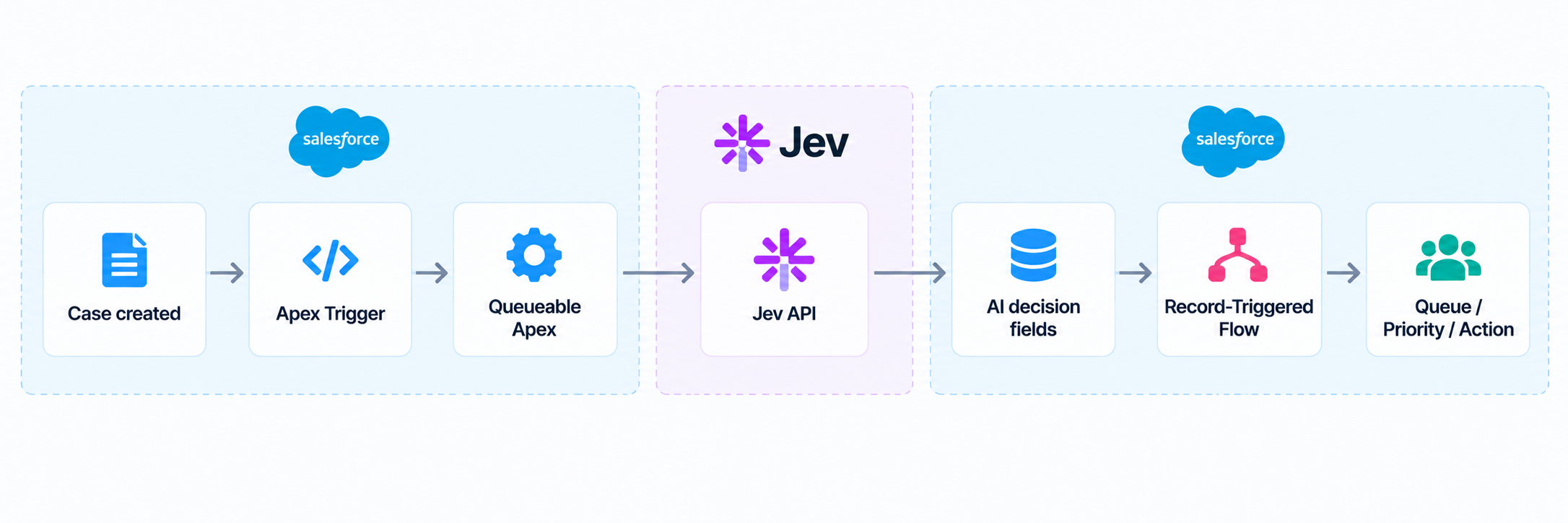
Keeping the callout out of the Case transaction
I kept the synchronous Case transaction small. The user creating a Case should not depend on an external HTTP service being available.
The trigger collects the new Case IDs and enqueues asynchronous work:
trigger CaseTrigger on Case (after insert) {
    Set<Id> caseIds = new Map<Id, Case>(Trigger.new).keySet();
    System.enqueueJob(new ClassifyCasesWithJevJob(caseIds));
}
In a real codebase I would normally put this behind a trigger handler. The inline version keeps the example focused on the Jev integration.
The Queueable implements Database.AllowsCallouts:
public with sharing class ClassifyCasesWithJevJob
    implements Queueable, Database.AllowsCallouts {

    private final Set<Id> caseIds;

    public ClassifyCasesWithJevJob(Set<Id> caseIds) {
        this.caseIds = caseIds;
    }

    public void execute(QueueableContext context) {
        List<Case> cases = [
            SELECT Id, Subject, Description, AccountId,
                   Account.Support_Plan__c
            FROM Case
            WHERE Id IN :caseIds
        ];

        for (Case currentCase : cases) {
            JevDecision decision = JevService.classify(currentCase);
            JevDecisionMapper.apply(currentCase, decision);
        }

        update cases;
    }
}
I would not assume that every trigger batch can make one callout per Case. Salesforce callout limits still apply. If Cases can arrive in large batches, I would chunk the work with a Queueable chain, a platform-event-based worker, or another batching strategy.
The external decision happens after the original Case transaction has finished.
Calling Jev from Apex
I configured the TypeSafe endpoint with a Salesforce Named Credential.
The request contains one state object and the four questions:
{
  "model": "jev-latest",
  "state": {
    "subject": "Unable to create quotes",
    "description": "None of our 80 sales reps can create quotes and we have a customer demo in two hours."
  },
  "questions": {
    "category": {
      "type": "choice",
      "instructions": "What is the primary type of support issue?",
      "criteria": {
        "technical": "A product error, malfunction or technical failure.",
        "billing": "Invoices, payments, refunds or charges.",
        "account": "Login, permissions, access or account administration.",
        "product": "Product usage, configuration, how-to or feature questions.",
        "other": "None of the other categories is a good fit."
      }
    },
    "impact": {
      "type": "score",
      "instructions": "How broad is the operational impact described by the customer?",
      "criteria": [
        "Low: isolated inconvenience with little operational impact.",
        "Medium: one or a small number of users or a non-critical workflow is affected.",
        "High: many users or an important business workflow is blocked or seriously degraded.",
        "Business-wide: a broad business operation or most/all relevant users are unable to work."
      ]
    },
    "urgency": {
      "type": "score",
      "instructions": "How quickly does this issue require attention based only on the situation described?",
      "criteria": [
        "Low: no meaningful time pressure.",
        "Medium: should be handled soon but normal support timing is acceptable.",
        "High: there is clear time pressure or a near-term business consequence.",
        "Critical: immediate attention is needed because a time-critical activity or major operation is blocked."
      ]
    },
    "information_sufficiency": {
      "type": "choice",
      "instructions": "Is there enough information for a support agent to begin investigating without first asking what is failing or what behavior is observed?",
      "criteria": {
        "insufficient": "The problem cannot be meaningfully investigated without first asking for basic clarification.",
        "partial": "The issue is understandable, but important diagnostic context is missing.",
        "sufficient": "The affected functionality and observed behavior are clear enough to begin investigating."
      }
    }
  }
}
TypeSafe's API evaluates those questions against the same state in one request, so I do not need four network calls for one Case.
The Apex service is a small HTTP client around that payload:
public with sharing class JevService {

    public static JevDecision classify(Case currentCase) {
        HttpRequest request = new HttpRequest();
        request.setEndpoint('callout:TypeSafe_Jev/v1/systemone');
        request.setMethod('POST');
        request.setHeader('Content-Type', 'application/json');
        request.setTimeout(10000);

        request.setBody(
            JSON.serialize(JevRequestFactory.forCase(currentCase))
        );

        HttpResponse response = new Http().send(request);

        if (response.getStatusCode() < 200 ||
            response.getStatusCode() >= 300) {
            throw new JevException(
                'Jev returned HTTP ' + response.getStatusCode()
            );
        }

        return JevResponseParser.parse(response.getBody());
    }

    public class JevException extends Exception {}
}
Writing the decisions back to the Case
For the experiment, I would keep Jev's output in dedicated fields instead of overwriting standard Case fields immediately:
- AI_Category__c
- AI_Category_Confidence__c
- AI_Impact__c
- AI_Urgency__c
- AI_Information_Sufficiency__c ...
That lets me inspect what Jev decided without losing the original Salesforce values.
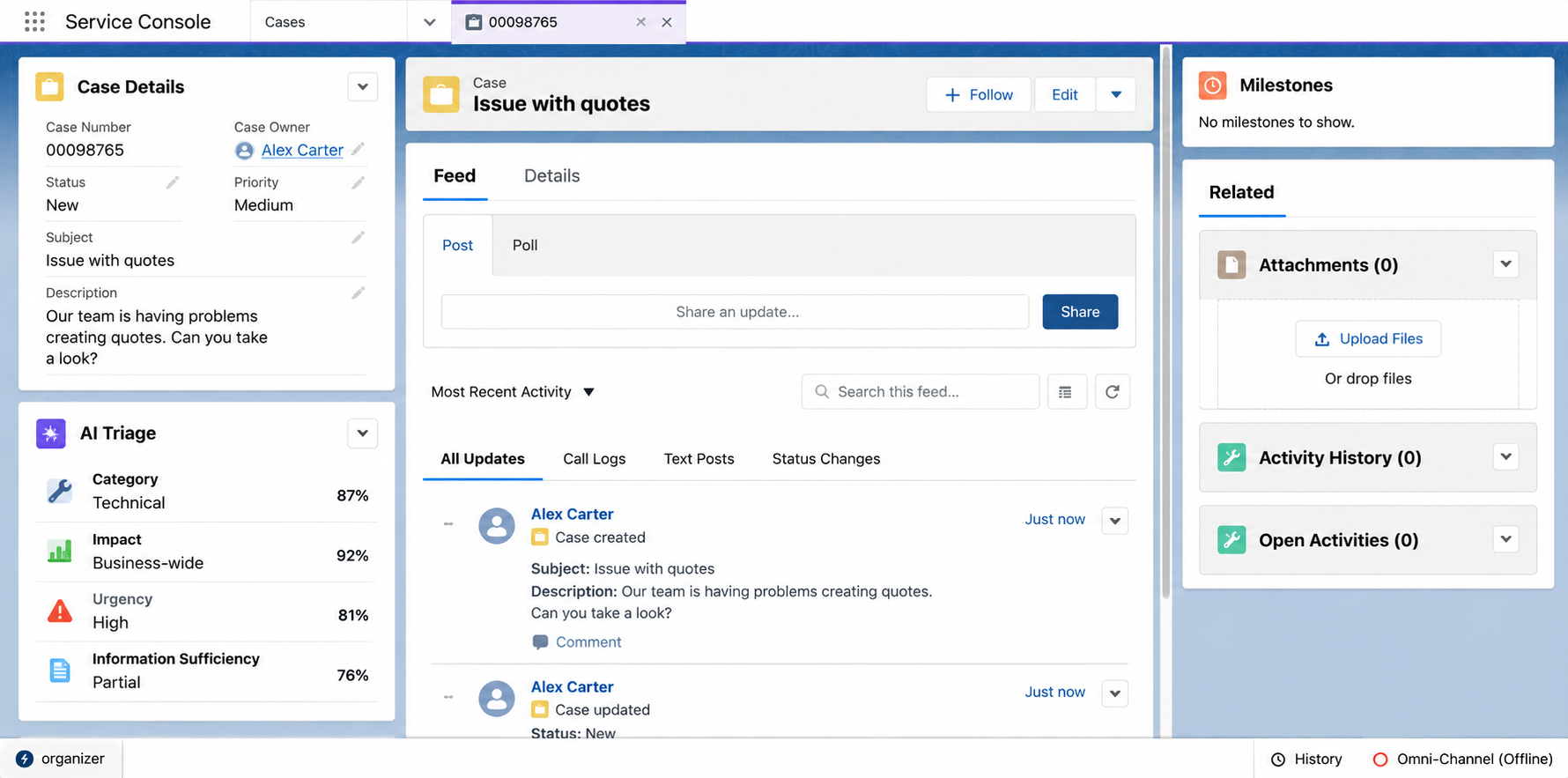
Once the Queueable writes those fields, any other automation can use them like any other Salesforce data.
Routing might look like this:
AI_Category__c = "TECHNICAL"
AND AI_Category_Confidence__c >= 0.85

→ OwnerId = Technical Support Queue
Priority can include account data that Jev never sees:
AI_Impact__c = "BUSINESS_WIDE"
AND AI_Urgency__c = "CRITICAL"
AND Account.Support_Plan__c = "Premium"

→ Priority = "Critical"
A weakly described Case can go down another path:
AI_Information_Sufficiency__c = "INSUFFICIENT"
AND AI_Information_Sufficiency_Confidence__c >= 0.85

→ Start Request More Information flow
Where I would use Jev in Salesforce
Salesforce already handles explicit conditions well. If a rule depends on a field value, permission, entitlement, date, amount, or another stored fact, I would keep using Flow, Apex, assignment rules, validation rules, or whichever native mechanism fits.
The awkward cases are rules that depend on the meaning of free text:
"Do X when the customer is describing a serious operational impact."
The idea is to keep the responsability of Jev to interpret the user's intention and attempt to translate it into measurable values. Then, Salesforce is the responsible for executing certain business process depending on those measurable values.
About the Author
I am Guillermo Miranda, a Salesforce Consultant specializing in defining and developing scalable solutions for businesses.
Need help with Salesforce?

I help businesses design and build scalable Salesforce solutions.