What Is Harness Engineering? The Engineering Behind AI Agents
What Harness Engineering means, which systems sit around an AI model, and why tools, context, permissions, verification and evals can matter as much as the model itself.
For a long time, when an AI agent failed, the obvious reaction was to rewrite the prompt or try a better model. Both can help, but they only touch one part of the system.
A coding agent can search a repository, open files, edit code, run tests, read documentation and keep working across many steps. The model itself is not directly doing those things on your computer. It decides what should happen next and produces an output that another piece of software turns into an action.
That surrounding software is the harness.
The model provides the reasoning capability. The harness gives that capability somewhere to operate: tools, filesystem access, state, context, permissions, command execution, validation and feedback loops.
Designing and improving that layer is what people increasingly mean by Harness Engineering.
The model is not the whole agent
Imagine asking a coding agent for a concrete change:
Add a visual warning to a Lightning Web Component when an opportunity has a high risk score, and cover the change with tests.
To do that properly, the agent has to find the component, understand where the risk data comes from, inspect any related Apex logic, edit the right files, run Jest and Apex tests, and check that nothing else broke.
The model can decide that it should first locate the LWC. But searching your repository requires filesystem access. It can propose a patch, but applying that patch requires an editing tool. It can decide to run tests, but something else has to execute the command and return the result.
The real flow looks closer to this:
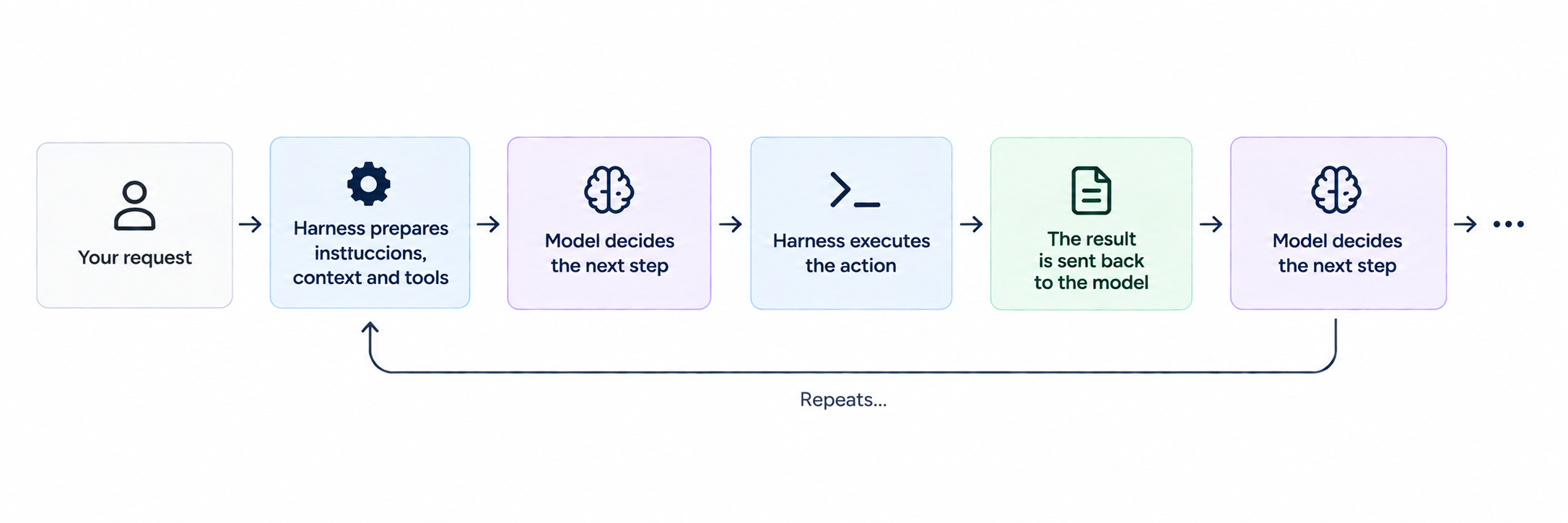
When Codex, Claude Code or another coding agent moves through a project, you are watching a model and a harness working together.
A clear example of a good harness is OpenClaw and how it is configured to enable a “living,” proactive agent.
What usually lives inside a harness
There is no single required architecture, but the same building blocks keep appearing.
Tools: how the agent acts
A tool is a capability exposed to the model with a name, description, parameters and return value.
A coding agent might receive tools such as:
search_code(query)
read_file(path)
edit_file(path, patch)
access_folder(path)
open_browser(url)
The model selects a tool and generates its arguments. The harness validates the request, performs the real operation and returns the result.
Tool design matters more than it first appears. An error that only says failed forces the model to investigate from almost zero. An error that identifies the file, line and reason for the failure gives the next model call something concrete to work with.
Loops and state for multi-step work
Real tasks rarely fit into one model call.
The agent first discovers files, then reads them, then changes code. A compiler error or failed test creates new information, which changes what it should do next.
A harness therefore runs a loop: call the model, execute an action, add the result to the state, and call the model again.
That state lives outside the model. It can track files already inspected, changes applied, command failures and work that is still pending.
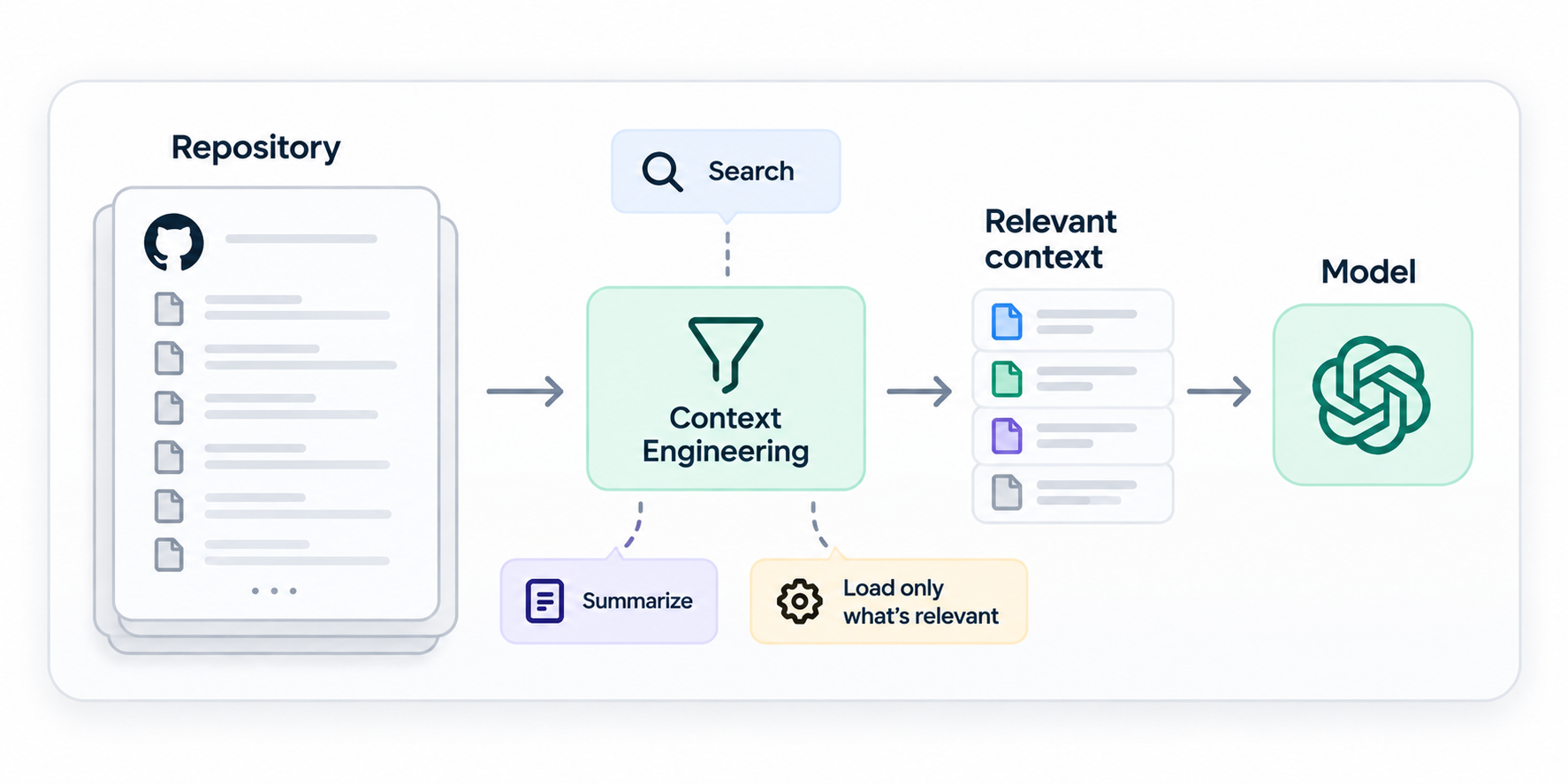
Context: deciding what is worth showing the model
A real repository can contain hundreds of thousands of lines. Sending the entire codebase on every turn would be expensive, noisy and often impossible.
The harness has to choose.
It can start with a small project map, let the agent search on demand, and load files only when they become relevant. When the execution grows too long, older information can be summarized or moved into structured notes.
This is part of Context Engineering.
Context engineering is therefore one part of the larger harness problem. The harness must also execute actions, maintain state, enforce permissions and verify results.
Environment and permissions
If an agent can run commands, it can also run the wrong command.
Serious agent systems do not rely only on a sentence such as "be careful." The harness can decide which tools exist, which directories can be changed, whether network access is available and which actions require human approval.
It can also give the agent an isolated sandbox or a disposable copy of the repository.
That distinction matters. An instruction has to be interpreted correctly by the model. A software-enforced permission is a boundary the model cannot simply reason its way around.
If an agent may read production data but must never modify it, that rule belongs in the permission system, not buried in a prompt.
Verification: making "done" measurable
One of the easiest mistakes with agents is treating the model's own final message as evidence.
"Implemented and working" is a claim, not a test result.
A good harness looks for evidence outside the model: test suites, builds, API responses, screenshots, browser interactions or database checks.
For the LWC example, completion might mean:
- the warning appears for the correct data;
- Jest tests pass;
- related Apex tests still pass;
- the build has no new errors;
- no unrelated files were changed.
According to Anthropic, it seems to work better when you separate the agent doing the work from the one reviewing it. In their experiments with long-running development tasks, they use a generator to implement the solution and an evaluator to check whether it actually meets the requirements.
The nice part is that the evaluator doesn’t have to trust what the coding agent says: it can test the app directly, even using a browser, and verify that everything works as expected.
Prompt Engineering, Context Engineering and Harness Engineering
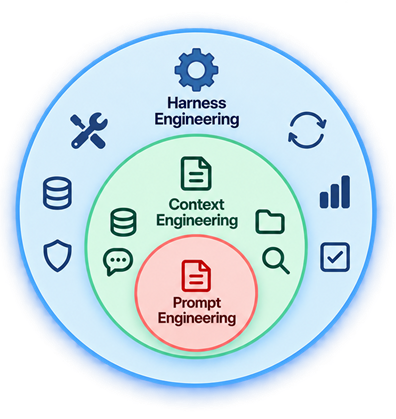
The three terms overlap, but they describe different scopes.
Prompt Engineering focuses mainly on instructions: how the task, constraints and desired behavior are expressed to the model.
Context Engineering decides which information accompanies those instructions at each step: history, files, tool results, documentation, memory and retrieved data.
Harness Engineering covers the full execution system. Prompts and context are part of it, alongside tools, loops, state, sandboxes, permissions, observability, verification and evals.
MCP fits into this picture as well. A Model Context Protocol server can expose more tools and information sources to an agent. MCP does not replace the harness: the harness still decides which capabilities to expose, when to use them, how to execute them and what to do with the results.
How do you improve a harness?
The engineering part starts when we stop treating the agent like a black box.
If something fails, it’s not enough to say “the model got it wrong.” We need to look at what information it received, which tools it used, what errors it encountered, and why it made certain decisions.
That helps us spot patterns, adjust prompts, tools, or requirements, and test again.
The loop looks much like engineering any other system:
run tasks
→ inspect results and traces
→ identify a recurring failure
→ change the harness
→ run the evaluations again
Harness Engineering is the practice of designing, measuring and improving the software around a model so it can complete real work in a controlled and verifiable way.
When an agent finds the right file, executes a tool, carries state from twenty steps earlier, asks permission before a sensitive action or checks the result before claiming completion, that behavior comes from the harness.
The model still matters. The agent's behavior also depends on everything we build around it.
About the Author
I am Guillermo Miranda, a Salesforce Consultant specializing in defining and developing scalable solutions for businesses.
Need help with Salesforce?

I help businesses design and build scalable Salesforce solutions.